Event Logger
- MediaMonkey Add-on -
Version 2.3
by Zvezdan Dimitrijevic
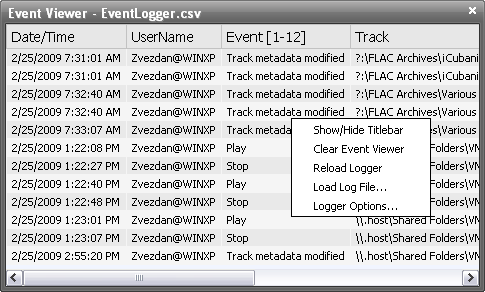
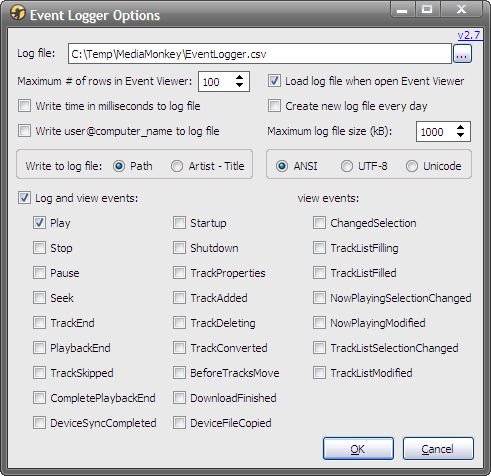
This add-on could be used with MediaMonkey v2.x or higher. It allows logging of next MM events: OnPlay, OnStop, OnPause, OnSeek, OnTrackEnd, OnPlaybackEnd, OnTrackSkipped, OnCompletePlaybackEnd, OnTrackProperties, OnTrackAdded, OnTrackDeleting, OnTrackConverted, OnBeforeTracksMove, OnStartUp and/or OnShutdown. Next data are stored in the log file: date/time, computer/user name, name of the event and track name. The location of the log file could be specified in the Options dialog box. The log file is saved in CSV format, so it could be imported e.g. in Excel. Events could be also displayed in real-time with the Event Viewer dockable panel.
For a discussion about this add-on, you could visit the related MediaMonkey forum thread. If you are using some skin which is not supported by default, you could take a look of skin styles for this add-on made by nynaevelan at the next forum thread.
Donation:
These add-ons are donationware. Their development took considerable amount of time, so if you found these add-ons useful and want to help their further development, it would be nice if you send some small donation. You could donate as much as you think that is appropriate, any amount would be really appreciated. NEW! Now with the PayPal option!.
What is new:
- v2.3 - 2011-06-22
- Added: LogOnTrackSkipped and LogOnCompletePlaybackEnd events [MM4];
- Fixed: skin styles path [MM4];
- Fixed: visible state of Event Viewer after restart when it is closed on the [x] button from the Titlebar.
- v2.2.1 - 2009-06-27
- Fixed: View Log File option and display of events in Event Viewer with log files in UTF-8/Unicode format.
- v2.2 - 2009-05-13
- Added: OnPlaybackEnd event;
- Improved: skin styles;
- Fixed: error with Maximal log file size.
- v2.1 - 2009-03-04
- Added: possibility to open a new log file when the file size is greater then specified value;
- Added: option in the context menu to open a specified log file into the Event Viewer;
- Added: display of information about opened log file and events range;
- Added: song position for Pause and Seek events;
- Improved: Event Viewer's skin automatically updated after skin change in the Options dialog box (only for supported skins).
- v2.0 - 2009-03-01
- Added: Event Viewer dockable panel;
- Added: possibility to toggle Event Viewer title bar from the contex menu (MM 3.1.0.1209 or up);
- Added: option Maximal # of rows in Event Viewer;
- Added: option Load log file when open Event Viewer;
- Added: option to save log file as ANSI, UTF-8 or Unicode.
- v1.1.2 - 2009-02-07
- Fixed: deleting of tracks when enabled logging of the OnTrackDeleting event.
- v1.1.1 - 2009-02-06
- Fixed: error with OnBeforeTracksMove and OnTrackProperties events.
- v1.1 - 2009-02-06
- Added: OnBeforeTracksMove and OnTrackProperties events;
- Fixed: log file name when the "Write a new log file every day" is turned on.
- v1.0 - 2009-02-05
Installation:
- For MediaMonkey 3.0 or higher - just double-click on the EventLogger-xx.mmip file; if you are on Vista or Win7 and you got "Product installation error", make sure you have MM3 set to "Run as Administrator"; if you downloaded the installation package with IE7 and it changed its extension to a .zip, you should first change it back to a .mmip.
- For MediaMonkey 2.x - rename a .mmip extension to a .zip, extract the EventLogger.vbs file to the MediaMonkey's "Scripts\Auto" folder and restart MM program.
Usage:
Choose View / Event Viewer to enable/disable dockable panel; add-on settings are in the Tools / Options dialog box within Event Logger tab (some work only with MM 3.1.0.1205 or up).