Playlist files/playlists could be saved in a hierarchically organized folders within the specified parent folder, using the same structure as sub-nodes of the selected node, or could be saved in a single folder using a specified string as separator. Playlist files could be saved in ANSI, UTF-8 or Unicode, while M3U files could have simple or extended format. Track paths could be URL encoded and stored absolute or relative to the playlist's path using Windows "\" or Unix "/" folder separator. If the relative path option is turned off, the paths stored in playlist files would be same as they are in the Path field of the database, but could be also replaced with the user-defined replacement, e.g. "c:\Documents and Settings\" could be replaced with "e:\My Music\". Paths that you want to replace could be specified using Regular expressions.
This add-on also allows copying of audio files, export of M3U nodes from My Computer branch (e.g. conversion of M3U files) and export of the selected node or selected tracks only.
|
If you are interested to comment about this add-on, you could visit its related MediaMonkey forum thread.
You could also take a look on my other add-ons for MediaMonkey. |
- v4.1.1 - 2019-11-22
- Fixed: removal of the old playlist files on export of the corresponding empty playlists.
- v4.1 - 2016-04-27
- Added: ClearSameNamePlsMode INI key (description is in the Additional INI keys section);
- Added: confirmation dialog box for removing child playlists from the target playlist when creating playlists from child nodes.
- v4.0.6 - 2015-10-05
- Fixed: settings of playlist for automatic export with non-skinned program (broken in 4.0).
- v4.0.5 - 2015-06-22
- Fixed: some things.
- v4.0.4 - 2013-08-03
- Fixed: error with Export As Playlist File to Selected Folder command in some cases;
- Fixed: export for some nodes from Library/collection branches using SQL.
- v4.0.3 - 2013-07-16
- Fixed: error when exporting playlists from the Playlists branch to parent/child folders.
- v4.0.2 - 2013-07-10
- Fixed: error when exporting playlists from the Playlists branch.
- v4.0.1 - 2013-07-10
- Fixed: error on startup.
- v4.0 - 2013-07-07
- Added: Export M3U Playlists from Child Nodes and Export M3U Playlists in Child Nodes to Same Folders commands to the menu which allow export of .m3u files from My Computer;
- Added: export to ASX and XSPF playlist files;
- Added: option to skip export of M3U nodes from My Computer branch;
- Added: option to skip export of "All" nodes from My Computer, Location and Magic Nodes (until now M3U and "All" nodes was skipped automatically);
- Added: option to store paths in playlist files using short DOS format (8.3);
- Added: several .ini keys for some options that are not represented with GUI: ExportOnStartupDelayMs, DontUseSQLForTracklist, PathsWithFullMNCaptions, AllNodesMode, SkipLastAllNodes, SkipAutoPlsSubNodes, UseLastExportM3UsDir, DontShowInfoBoxOnExportEnd, EventLoggerMode (please read the Additional INI keys section about them);
- Improved: much faster export using SQL for almost all nodes from Library (and collections in MM4) and Magic Nodes which doesn't need to refresh tracklist for each exported node (faster export of Magic nodes requires MN version 5.0 that is not released yet);
- Improved: faster creation of playlist files, especially larger ones containing too many tracks;
- Improved: updates of progress bar are now much smother;
- Fixed: export of playlist files in ANSI format with paths containing non-ANSI characters using short DOS format because of Logitech Media Server (LMS) bug regarding UTF-8 files;
- Fixed: when using Export Child Nodes to Playlist Files & Copy Media Files, the media files are not copied to the destination if there are already previously copied files with the same or newer date/time.
- v3.6.1 - 2012-01-09
- Fixed: URL paths in .m3u files option for network drives using UNC.
- v3.6 - 2011-11-21
- Added: Export As .m3u Playlist to Selected Folder and Export M3Us for Child Nodes to Same Folders commands to the File menu and the tree's context menu which allows export of the selected node (and its sub-nodes) to the same folder(s) with media files (only enabled for nodes within Location and My Computer branches).
- v3.5.3 - 2011-10-26
- Fixed: empty string specified in Options box (e.g. with: text box) replaced with default value after restart;
- Fixed: From text box for auto-export in Options box now accepts manually entered nested playlists using "\" as separator.
- v3.5.2 - 2011-06-12
- Fixed: Export M3Us & Copy Files for Child Nodes command (broken in v3.4).
- v3.5.1 - 2011-04-22
- Fixed: the From field for automatic export when Playlists is specified;
- Fixed: automatic export Every xx minutes without need to restart the program.
- v3.5 - 2011-04-17
- Added: Export As .m3u Playlist command to the File menu and the tree's context menu which allows export of the selected node (similar to the Send To \ Export as .m3u playlist option, but more configurable).
- v3.4.1 - 2011-03-17
- Fixed: error on start-up (broken in v3.3) [MM2].
- v3.4 - 2011-01-17
- Added: Replace paths/with: dropdown lists with the last 5 entered strings;
- Fixed: automatic export on shutdown if automatic export on every xx minutes is not used;
- Fixed: settings of playlist for automatic export with non-skinned program;
- Fixed: export of .m3u files for nodes which are grandchildren of nodes without tracks;
- Fixed: export of .m3u files for playlists when some of parent playlists has duplicate name on the same node level;
- Fixed: restoring of expanded state of nodes after finished export.
- v3.3 - 2010-07-13
- Added: Export As .m3u Playlist command to the main tracklist and Now Playing context menu which allows export of selected tracks only (similar to the Send To \ Export as .m3u playlist option, but more configurable).
- v3.2 - 2010-07-02
- Changed: Unix folder separator option to Unix .m3u file format; a .m3u files would have both the "/" as a folder separator and a new line without a carriage return when this option is turned on.
- v3.1 - 2010-06-21
- Added: Export M3Us & Copy Files for Child Nodes command which allows copying of audio files beside of exported .m3u files.
- v3.0.1 - 2010-05-23
- Fixed: error with URL paths in .m3u files and ANSI/Unicode formats.
- v3.0 - 2010-05-22
- Added: option to export all .m3u files to single folder using specified string as separator between node names in .m3u filenames (e.g. e:\Playlists\Rock - Pink Floyd - Dark Side of the Moon.m3u, using " - " as separator);
- Added: option to store URL encoded paths in .m3u files (e.g. file:///C:/Temp/%D0%97%D0%B2%D0%B5%D0%B7%D0%B4%D0%B0%D0%BD.mp3).
- v2.9.3 - 2010-05-20
- Fixed: automatic export on startup, now with 1 second delay to enable loading of main window.
- v2.9.2 - 2010-04-22
- Fixed: export with First level and Last level of nodes only options for All nodes in Location and My Computer branches.
- v2.9.1 - 2010-04-20
- Fixed: error when the Create playlists for child nodes sub-menu is displayed if the last created playlist doesn't exist, e.g. if you start MM with some another database file.
- v2.9 - 2010-04-05
- Added: option to save .m3u files/create playlists for the last (deepest) level of nodes only;
- Added: option to save paths in .m3u files using Unix separator ("/") instead of Windows ("\");
- Improved: speed of displaying menu with playlists if there are many of them;
- Changed: the list of playlists in the Options dialog box is now limited to playlists on the first level because the large number of nested playlists have slowed down its display; if you need to specify some nested playlist, you could still write it using "\" as a separator between nested levels. .
- v2.8 - 2009-08-25
- Added: option to save .m3u files in child folders, i.e. one level more in depth (until now they are saved to parent folders only).
- v2.7.2 - 2009-04-08
- Fixed: RegExp string for replacement of folders.
- v2.7.1 - 2009-04-08
- Fixed: error during installation.
- v2.7 - 2009-07-08
- Added: option to replace folders in .m3u files with specified string;
- Added: option to remove Byte-order mark (BOM) from the begin of UTF-8 files.
- v2.6.1 - 2009-04-21
- Fixed: error with Options sheet and playlists with duplicated names.
- v2.6 - 2009-04-20
- Added: option to create a new dated folder once in a day.
- v2.5 - 2009-04-20
- Added: option for an automatic export on startup;
- Added: option to create a new folder with a date/time in its name for every auto-export.
- v2.4 - 2009-04-19
- Added: option to automatically export specified playlists on shutdown or periodically with customizable time interval.
- v2.3 - 2009-04-17
- Added: option to exclude AutoPlaylists from export.
- v2.2 - 2009-04-16
- Added: option to save .m3u files in simple or extended format;
- Improved: speed when export nodes from Playlists branch.
- v2.1 - 2009-02-25
- Added: option to save .m3u files as ANSI, UTF-8 or Unicode.
- v2.0 - 2009-02-12
- Added: possibility to create playlists in the Playlists node in similar way as export of .m3u files.
- v1.4 - 2009-01-24
- Improved: speed with MM 3.1.0.1218 and up, especially for empty tracklists.
- v1.3 - 2009-01-10
- Added: option to export the playlist for the parent (selected) node (beside of child nodes);
- Added: option to exclude unavailable tracks from export;
- Improved: speed and work with the All nodes from My Computer and Location branch;
- Fixed: relative paths;
- Fixed: playlist filenames for some Magic Nodes, e.g. Album Artist with Album (MN v2.0 or up required).
- v1.2.1 - 2008-11-29
- Fixed: export when turned on the Regular expressions option and turned off the Skip for folders option.
- v1.2 - 2008-11-29
- Added: an option to store track paths relative to the playlist path (default setting);
- Added: an option to skip export of playlists for specified nodes/folders (e.g. DiscXX for multi-CD);
- Added: an option to use Regular expressions for specifying nodes/folders;
- Added: an option to exclude files with specified extensions from export;
- Added: skipping of All node (even for Magic Nodes) and playlist files from My Computer branch from export;
- Fixed: unersponsive program with 100% CPU when trying to export an empty node/folder (e.g. in My Computer node).
- v1.1 - 2008-11-28
- Added: an option to recursively scan all sub-levels of the selected node (default setting), playlists are stored in a hierarchically organized folder structure, same as with the selected node.
- v1.0 - 2008-11-27
- First public version.
- For MediaMonkey 3.0 or higher - just double-click on the ExportM3UsForSubNodes-xx.mmip file; if you are on Vista or newer Windows and you got "Product installation error", make sure you have MM3 set to "Run as Administrator"; if you downloaded the installation package with IE7 and it changed its extension to a .zip, you should first change it back to a .mmip.
- For MediaMonkey 2.x - rename a .mmip extension to a .zip, extract the ExportM3UsForSubNodes.vbs file to the MediaMonkey's "Scripts\Auto" folder and restart MM program.
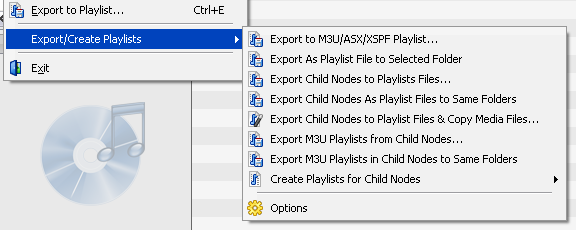
The commands of this add-on are located in the Export/Create Playlists sub-menu in the File menu and the context menus of the Media Tree, the main filelist and Now Playing panel.
First of all, you need to understand the difference between playlist files and MediaMonkey playlists (or shorter "playlists"): the playlist files are the lists of media files stored in M3U, ASX or XSPF files, while the playlists are the lists of media files stored in the MediaMonkey database and visually represented inside of the Playlists folder of the Media Tree.
The Export/Create Playlists add-on could export list of media files to the playlist file(s) using some of the Export commands from its menu, or it could add list of media files to the MM playlist(s) using the Create Playlists for Child Nodes command from the menu. The Export commands could be seen as an extension to the built-in Send to / M3U/XSPF playlist menu command, while the Create Playlists command could be seen as some kind of extension to the built-in Send to / Playlist menu command.
The commands in the File menu and the context menu of the Media Tree could be applied on the node selected in the Media Tree panel, using them you will get exported/created playlists for the selected node and/or its sub-nodes (depending of your settings in the add-on's Options dialog box). The following commands are available:
If you want to export just selected tracks, choose Export to M3U/ASX/XSPF Playlist... from the context menu of the main tracklist or Now Playing panel.
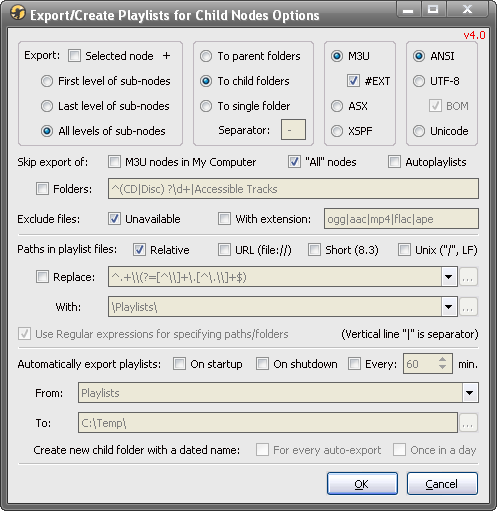
The add-on settings are located in the Options dialog which you could get if you: 1) chose the Options command from the File | Export/Create Playlists menu, or 2) select Export/Create Playlists add-on in the Tools | Extensions dialog box and click on the Options button, or 3) select the General | Export/Create Playlists sheet in the Tools | Options dialog box.
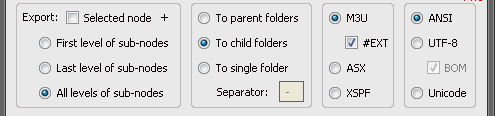
In the first group of controls on that dialog we could specify what we want to export if we choose some command from the menu that exports sub-nodes, e.g. Export Child Nodes to Playlists Files... or any other command that contains "Child Nodes" in its name. If the Selected node option is turned off then only sub-nodes of the selected node would be exported, while if it is turned on the selected node would be exported as well. With the next 3 options we could choose which levels of sub-nodes we want to export: the first level, the last level or all levels.
Let say, for example, that I have the following tree branch and that I have selected the Rock node:
- Rock
- Pink Floyd
- Dark Side of the Moon
- Wish You Were Here
With the second group of options we have 3 choices to specify where and how we want to store playlists: to parent folders, to child folders or to a single folder. However, the settings in this group have only effect with the "Child Nodes" commands with the "..." on the end of a name, e.g. Export Child Nodes to Playlists Files..., i.e. the commands that allow us to specify some arbitrary destination folder. Those settings are ignored with the "Child Nodes" commands with the "to Same Folders" text on the end of a name, e.g. Export Child Nodes As Playlist Files to Same Folders, since in that case the playlist files are always stored to the same folders with media files.
Here is the same example of the "Rock" branch with the previously ticked All levels of sub-nodes option. If I have ticked To parent folders I would get "Pink Floyd" playlist file in the specified destination folder and "Dark Side of the Moon" and "Wish You Were Here" playlist files in the "Pink Floyd" sub-folder of that specified folder. If I have ticked To child folders I would get "Pink Floyd" playlist file in the "Pink Floyd" sub-folder of the specified folder, "Dark Side of the Moon" playlist file in the "Dark Side of the Moon" sub-folder of the "Pink Floyd" folder and "Wish You Were Here" playlist file in the "Wish You Were Here" sub-folder of the "Pink Floyd" folder.
Finally, If I have ticked To single folder I would get all files in the specified folder, i.e. I would get "Pink Floyd", "Pink Floyd - Dark Side of the Moon" and "Pink Floyd - Wish You Were Here" playlist files in the same folder. With the Separator option we could specify which string of characters we want to use as a separator between nested levels of nodes; by default it is " - " (without the double quotes, of course), as it is in the previous example.
Those last examples are such that if I have the Selected node option turned off. However, if I turn that option on, I would get one additional, "Rock" sub-folder in the specified folder and inside of it there would be created folders mentioned in the previous two examples with To parent folders and To child folders options. If I choose To single folder with the Selected node option turned on, then I would get "Rock - Pink Floyd", "Rock - Pink Floyd - Dark Side of the Moon" and "Rock - Pink Floyd - Wish You Were Here" playlist files in the specified folder.
With the third group of options we could specify the format of the exported playlist files: .m3u, .asx or .xspf. If we choose export to the M3U format, with the #EXT option we could further specify the format of the exported .m3u files. If that option is turned off, we would get the so-called Simple M3U format, i.e. .m3u files will have only list of paths to the media files, e.g.:
c:\My Music\Rock\Pink Floyd\Dark Side of the Moon\01 - Speak to Me; Breathe in the Air.mp3
c:\My Music\Rock\Pink Floyd\Dark Side of the Moon\02 - On the Run.mp3
However, if the #EXT option is turned on, we would get the Extended M3U format, with the additional information about each included media file which helps faster display of added/opened playlists in many players, but some another players don't support such extended M3U format:
#EXTM3U
#EXTINF:240,Pink Floyd - Speak to Me; Breathe in the Air
c:\My Music\Rock\Pink Floyd\Dark Side of the Moon\01 - Speak to Me; Breathe in the Air.mp3
#EXTINF:213,Pink Floyd - On the Run
c:\My Music\Rock\Pink Floyd\Dark Side of the Moon\02 - On the Run.mp3
The fourth group of options determines encoding format of the exported playlist files: ANSI, UTF-8 and Unicode (UTF-16). You should choose UTF-8 or Unicode if you have non-ANSI characters in your paths of audio files, e.g. Cyrillic, but you should first check if such files are supported with your media player. If you choose UTF-8 format you could specify if playlist files should have BOM characters. A byte-order mark (BOM) is the invisible Unicode character placed at the begin of the file, it is used as a marker to indicate that text is encoded in UTF-8; you should uncheck this option if you have a player that cannot read files with a BOM. By the way, if you modify some playlist file in UTF-8 format using Notepad, it will save that file with added BOM always.

The next group of options determines what we want to skip/exclude from the export. We could skip M3U nodes from My Computer branch of the tree, "All" nodes from My Computer, Location and Magic Nodes branches, Autoplaylists from the Playlists branch and nodes/folders with the specified name(s). Names of folders could be specified using regular expressions if that option is turned on, but even if we don't use regular expressions we could specify several names of nodes/folders for skipping using the vertical line "|" as a separator.
If some named folder is skipped during the export, then all its sub-folders would be skipped as well. The sub-nodes of "All" nodes from the Location branch are skipped by design even if you turn off skipping of "All" nodes. The M3U and "All" nodes from My Computer branch don't have sub-nodes anyway. The Skip export of - M3U nodes option is ignored if we choose Export M3U Playlists from Child Nodes or Export M3U Playlists in Child Nodes to Same Folders commands from the menu. The last (rightmost) level of "All" nodes in My Computer branch could be skipped using the SkipLastAllNodes INI key to get consistent behavior with "All" nodes from Location branch which will be explained later in the Additional INI keys section. Also, the export of sub-nodes of Autoplaylists depends of the SkipAutoPlsSubNodes INI key which will be explained later.
The exported playlist files and created playlists contain only the media files that are displayed in the tracklist for each corresponding source node. With the Exclude files options we could specify which media files should be additionally omitted from the playlists during the export: unavailable files and/or files with the specified extension(s). The several extensions could be specified using the "|" as a separator, e.g. ogg|aac|mp4.
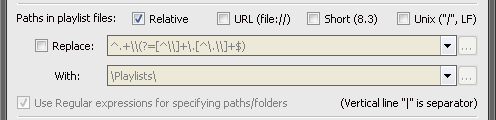
The next group of options determines how paths of media files will be stored in playlist files. With the Relative option we could choose if we want paths in playlist files in relative or absolute format. Absolute paths represents full paths to the media files as you could see from the previous examples for the Extended .m3u format. Relative paths represents paths of the media files relative to the path of the playlist file. For example, if I choose export to parent folders, I would get "Dark Side of the Moon" playlist file with relative paths as:
Dark Side of the Moon\01 - Speak to Me; Breathe in the Air.mp3
Dark Side of the Moon\02 - On the Run.mp3
Relative paths could help if you have different paths on the source and destination computers/players (e.g. different absolute paths c:\My Music\Rock\Pink Floyd\Dark Side of the Moon\02 - On the Run.mp3 on the computer and e:\Music\Rock\Pink Floyd\Dark Side of the Moon\02 - On the Run.mp3 on the player would have the same relative path Dark Side of the Moon\02 - On the Run.mp3), but some players don't support them, so you should check first if you could use that option. You should export playlist files to the same drive with media files, otherwise the relative paths cannot be determined and absolute paths would be used instead.
With the URL (file://) option we could choose another format for paths in playlist files. If I turn that option on, with the previous example I would get:
file:///c:/My%20Music/Rock/Pink%20Floyd/Dark%20Side%20of%20the%20Moon/01%20-%20Speak%20to%20Me%3B%20Breathe%20in%20the%20Air.mp3
file:///c:/My%20Music/Rock/Pink%20Floyd/Dark%20Side%20of%20the%20Moon/02%20-%20On%20the%20Run.mp3
There is small number of players that require playlist files with such paths, so most probably you wouldn't need that option.
With the Short (8.3) option we could get paths in old DOS format that are required on some players. That option works only with the existing files, so the Exclude unavailable files option should be turned on for it. Also, it is not possible to use URL and Short paths at the same time. If this option is turned on then all folders/filenames will be stored using such short form. For example, with the following full path:
D:\Music FLAC\Kurt Masur; New York Philharmonic Orchestra\Dvořák; Symphony #9, Slavonic Dances\01 Dvořák_ Symphony #9 In E Minor, O.flac
we would get:
D:\MUSICF~1\KURTMA~1\DVOK_S~1\01DVOK~1.FLA
However, some players like Logitech Media Server (LMS) require short form only for folders/filenames with non-ANSI characters, like this:
D:\Music FLAC\Kurt Masur; New York Philharmonic Orchestra\DVOK_S~1\01DVOK~1.FLA
So, in that case to get such paths you should turn on ANSI file format and turn off Short (8.3) paths.
With the Unix ("/", LF) option we could also specify format for paths in playlist files. If your media player has some Unix variation as Linux for its OS, you should turn that option on. In that case paths of media files would have the "/" separator between folders instead of "\" and the new lines would be represented with the LF character instead of CR+LF as it is in Windows.
With the Replace and With options we could replace parts of paths with another string in almost same way as we could do it in e.g. Notepad using its Replace option (well, maybe as with EditPad or similar advanced text editor which also supports Regular expressions). Within the Replace text box you could specify string which you want to replace and with the second, With text box you could specify string for replacement. You could also use the "..." buttons to specify paths, but only if you want to replace one folder with some another. For example, "c:\Documents and Settings\My Name\My Music\" could be replaced with "e:\Music\.
However, with the Use Regular expressions for specifying paths/folders option we could specify very complex patterns for replacement, e.g. we could replace several different paths with the single one at once. For example, the "^.+\\(?=[^\\]+\.[^\.\\]+$)" string is the expression which represents any full path, excluding the filename and the extension. So, using that expression, if you leave the With text box empty, all folders would be removed from paths, saving only filenames and extensions into playlist files, or you could enter "e:\Music\" in the With text box and all folders would be replaced with that single one. Although, you should turn on the Regular expressions only if you know how to use them.
The Use Regular expressions option has an effect on both Replace - Paths in playlist files and Skip export of - Folders options, i.e. you cannot use the Regular expressions for the first option and not to use them for the second option, and vice versa. Also, the Replace option cannot be used with the Relative paths.
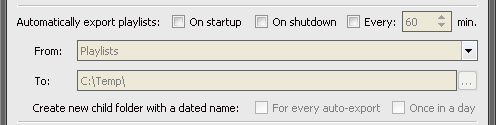
The next group of remaining controls on the Export/Create Playlist dialog is used only for automatic export of MM playlists to the playlist files. We could choose when playlists should be exported: On startup, On shutdown and/or Every xx minute(s). Then we could choose the playlist which should be automatically exported (altogether with its sub-playlists) using the From dropdown list. Only playlists from the first level in Playlists branch could be directly selected from that list, but some nested playlist could be also specified using "\" as a separator between sub-levels. Within the To text box we should specify the folder where we want to get exported playlist file(s). Its usage is similar to the destination folder specified after chosen some "Child Nodes" command from the menu for the manual export. This also means that almost all previously mentioned options are shared for manual and automatic export including "Export to parent/child/single folder(s)", "Relative paths" and so on.
With the Create new child folder with a dated name option we could specify if we want automatically exported playlist files in separated folders with dates in their names which would be within the folder specified in the To text box. If the For every auto-export option is turned on, dated folders with playlist files would be created whenever the condition for automatic export is satisfied, e.g. if Every xx minutes is chosen then every specified minutes would be created a new folder. If the Once in a day option is turned on, folders with dates in their names would be created only once in a day.
There are some keys in the [ExportM3UsForChildNodes] section of the MediaMonkey.ini file for some less used options that are not represented with GUI:
-- AllNodesMode = 0 - "All" nodes are exported instead of their parents, i.e. the playlist files would contain paths to files in corresponding nodes and all their sub-nodes (the default behavior of the add-on versions before v4.0);
-- AllNodesMode = 1 - "All" nodes are exported with parent node names, the result could be very similar to the previous mode;
-- AllNodesMode = 2 - "All" nodes are exported with "[All]" playlist names, should be avoided with To parent folder option;
-- AllNodesMode = 3 - "All" nodes are exported as "Parent_Name [All]" playlist names (default mode);
The MediaMonkey.ini file is stored in the c:\Documents and Settings\User_Name\Application Data\MediaMonkey folder for MM4 and Win7. You could find the location of the .ini file depending of the version of MediaMonkey and Windows here. If you want to modify any key in it using e.g. Notepad, you should do that with closed MediaMonkey application.
To be able to use this add-on, you need to have the Media Tree displayed (set in the View menu). Additionally, if you want to export the M3U playlist files, you need to have the My Computer branch visible (set in the Manage Collections dialog box) and you should have turned on the option Show M3U playlists in My Computer nodes on the Library / Appearance page of the Options dialog box from the Tools menu.
You should not change the nodes in the Media Tree while the add-in is running! In fact, it is highly recommended that you do not use the program until the add-on finishes its work. If it takes to long and you want to abort it, you could choose the Terminate option from the context menu of the progress bar.
Exported playlists from the Playlists branch are all saved as playlist files with fixed content, even auto-playlists. If you import such playlist files on another computer, you will get only static playlists, even with files that was exported from auto-playlists. So this add-on cannot be used to transfer auto-playlists from one computer to another in their native form. If you want such possibility, you could use Restore/Synchronize Database add-on instead, but it allows export/import only for the whole Playlists branch, while this add-on could export/import just the selected playlist and its sub-playlists.
Windows has the limitation on the path length of 260 characters; the files with longer path will not be created/copied on export, which applies both to playlist and media files (if you use any "... Copy Media Files" command from the menu). If you want to find out if any file is skipped on export, you could install the Event Logger add-on with the added EventLoggerMode key to the Ini file as it is mentioned in the Additional INI keys section.
Refreshing of the tracklist works very strange in MediaMonkey 2.x and because of that you need to click on the confirmation dialog after every generated playlist, i.e. for every sub-node. This confirmation dialog is not needed with MM 3.x, and the speed and reliability are much better if you have installed MM 3.1.0.1218 or higher. Nodes within the Playlist branch don't have such limitation, only regular nodes. Also, with the version 4.x of the add-on, almost all nodes from the Library [MM2-3] and collections (Entire Library, Music, ...) [MM4] are exported using SQL without the mentioned limitation.
You could directly select a playlist for automatic export in the From combo box in the Options box only for playlists on the first level, i.e. a playlist which is a child of the Playlists node. If you want to auto-export a nested playlist, you could do that if you manually enter a full path to that playlist using "\" as a separator between nested levels, e.g. Genres\Rock\Pink Floyd. This also means that you cannot use the "\" character in the playlist names specified in that combo box. However, this limitation has only the playlist specified in the From path for the automatic export - other exported playlists has not that limitation, even the child playlists of that playlist could have "\" in their names. It is even possible to specify the name of some nested playlist without its full path, but only if that name is unique.
This add-on is a false positive reported as a worm by F-Secure. The author of F-Secure promised me that will update its database and put the add-on on white-list, but still didn't. If you go to the www.virustotal.com/en/ site, you will see that it is safe tested by 54 popular anti-virus engines; the only one reporting a worm in it is F-Secure.